WordPress 7.0 marks a major shift in how the platform approaches artificial intelligence. Instead of treating AI as a collection of disconnected plugins and third-party integrations, the release introduces an infrastructure layer designed to give developers a shared foundation for building smarter publishing, design, search, accessibility, and automation features directly inside WordPress.
The change is less about launching a single AI chatbot and more about creating a consistent framework that themes, plugins, hosts, and site owners can build on. For a platform that powers a significant portion of the web, that distinction matters. AI is starting to become part of the architecture itself rather than an optional layer bolted on afterward.
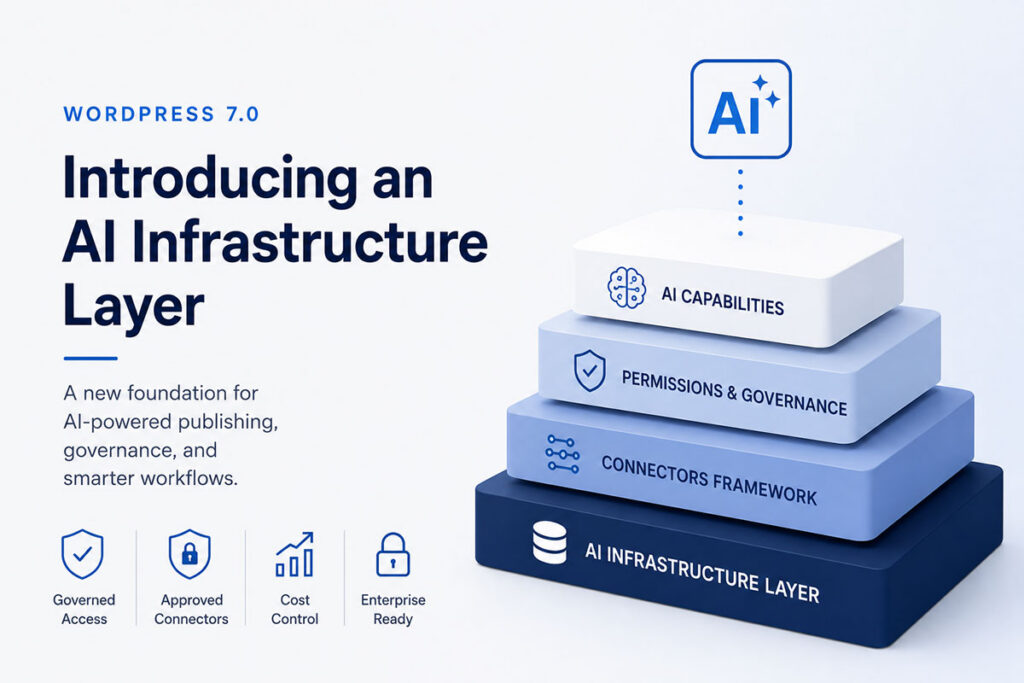
What the AI infrastructure layer is meant to do
At its core, the new system gives WordPress a more standardized way to connect with AI services, manage requests, handle permissions, and expose AI-powered capabilities throughout the admin experience.
Rather than every plugin implementing its own approach to prompts, models, credentials, and user controls, WordPress can now provide common patterns that developers can build around. That could make AI features feel more predictable for users and easier to maintain for developers.
It also gives site owners more visibility into which providers are being used, what data may be leaving the site, and how AI-assisted actions are integrated into publishing workflows.
Where Connectors fit into the new AI layer
One of the most important parts of the new infrastructure is the Connectors system. Connectors act as the approved bridge between WordPress and external AI services, APIs, and automation providers.
Instead of allowing every plugin to quietly create its own connection to an outside model or service, WordPress introduces a more visible and standardized approval flow. Plugins can request access to AI providers, while administrators can review and approve those requests from a centralized interface.
That matters because many AI features depend on sending data outside the WordPress installation. A writing assistant may send draft content to a language model. An image generation tool may send prompts to a visual AI service. An SEO plugin may analyze content using an external API.
Without a shared approval system, site owners can quickly lose track of which plugins are connecting to which services and why.
How the Connectors approval system works
The approval system is designed to make those relationships explicit. Plugins that want to use an AI provider can register a Connector and request permission through a standard WordPress interface.
During testing, WordPress surfaced approval requests for plugins including SEO tools, AI assistants, and custom plugins before allowing them to access connected AI providers. Instead of silently using API credentials behind the scenes, plugins appeared inside an approval matrix where administrators could choose which components of the site were allowed to interact with AI services.
In practice, this creates a governance layer for AI access inside WordPress.
Permissions can potentially be tied to:
- specific plugins requesting AI access
- user roles and administrator permissions
- individual AI providers or approved models
- site-wide or multisite network policies
- host or enterprise-level restrictions
Hosts and enterprise teams may also be able to enforce broader restrictions, such as requiring organization-approved credentials or limiting which AI services can be used across a site network.
Why this matters for publishers and developers
For plugin developers, Connectors create a clearer contract. They can build AI-powered functionality without inventing separate credential screens, approval flows, and provider management systems each time.
For publishers and site owners, the benefit is visibility and accountability. AI connections become visible parts of the platform rather than hidden implementation details buried inside individual plugins.
This becomes increasingly important as AI features expand across:
- content writing and editing assistance
- SEO analysis and recommendations
- image generation and media workflows
- accessibility improvements
- site search and content discovery
- workflow automation
A modern WordPress site may eventually have multiple plugins requesting AI access simultaneously. The Connectors system gives administrators a centralized place to evaluate those requests and make decisions based on trust, security, cost, and business requirements.
Controlling API costs before they become a problem
The approval model may also help address one of the biggest practical concerns surrounding AI services: usage-based pricing.
Many AI APIs charge based on requests, tokens, or generated media. A poorly configured plugin, an unexpected traffic spike, or an overactive automation could generate real expenses very quickly.
By routing access through approved Connectors, WordPress creates a clearer path toward:
- usage limits for specific plugins or providers
- API cost monitoring and reporting
- provider-level controls
- request logging and audit trails
- administrator approval workflows
Even if every part of that system does not exist yet, the infrastructure creates a centralized place for those controls to evolve.
For agencies, publishers, schools, and businesses managing multiple WordPress sites, that visibility may become just as important as the AI features themselves.
A foundation rather than a finished product
The larger takeaway is that WordPress 7.0 is not simply adding AI tools. It is preparing the platform for a future where AI capabilities are deeply integrated throughout the publishing stack.
The infrastructure layer gives developers a shared technical foundation, while the Connectors approval system gives administrators a way to manage trust, permissions, and cost control across the platform.
The current rollout still feels early in places, and many features remain experimental. But the direction is becoming increasingly clear: WordPress is moving toward AI as a native platform capability rather than a disconnected collection of third-party add-ons.
WordPress may not have released the most advanced AI writing tools yet, but it may have quietly introduced something more important: a standardized framework for how AI services are governed, connected, and managed across one of the world’s largest publishing ecosystems.